In acest articol voi folosi un display LCD 128*160 cu chipsetul ST7735.
Pentru a-l folosi am folosit libraria TFT_ST7735. Aeasta poate fi descarcata de la acest link.
Alimentarea acestui display se face cu 3,3V.
Pretul acestui display este de 47 lei si se poate cumpara de aici.
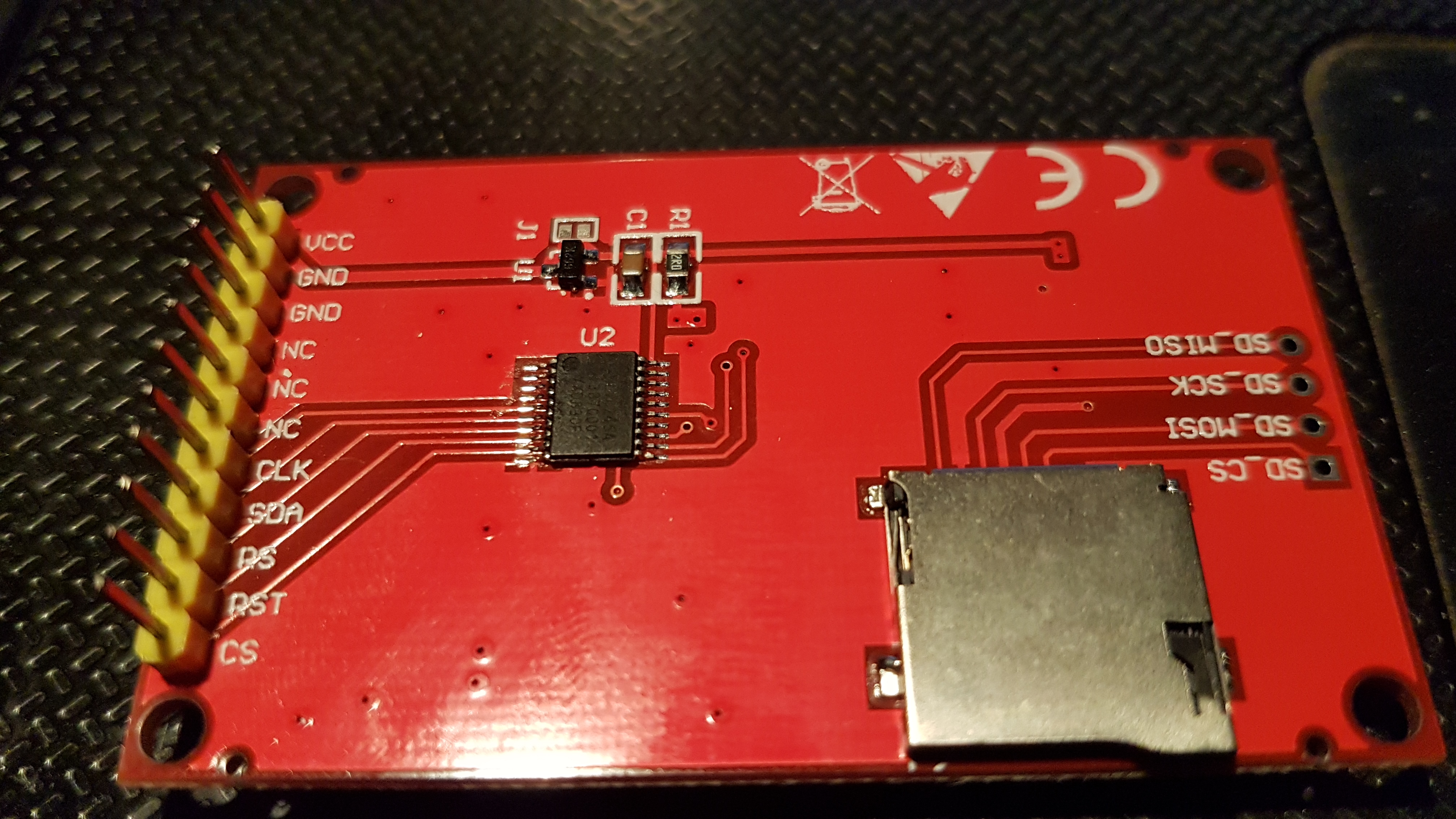
Conexiunile sunt urmatoarele:
Display LCD -------------------Arduino Uno
CLK ---------------------------- D13
SDA ---------------------------- D11
RS ------------------------------ D8
RST ---------------------------- D7
CS ------------------------------ D9
O imagine cu spatele afisajului o voi posta mai jos.
Sketch-ul folosit este urmatorul:
#include <TFT_ST7735.h>
#include <SPI.h>
TFT_ST7735 tft = TFT_ST7735();
#define TFT_GREY 0x5AEB

void setup() {
  tft.init();
  tft.setRotation(2);
  tft.fillScreen(TFT_GREY);
  tft.setTextSize(1);

  tft.fillRect(2, 2, 122, 20, TFT_CYAN);
  tft.setCursor(4, 4, 2);
  tft.setTextColor(TFT_RED);
  tft.println("www.");

  tft.fillRect(2, 25, 122,20, TFT_CYAN);
  tft.setCursor(4, 27, 2);
  tft.setTextColor(TFT_RED);
  tft.print("  electronicstore");

  tft.fillRect(2, 48, 122, 20, TFT_CYAN);
  tft.setTextColor(TFT_RED);
  tft.setCursor(4, 52, 2);
  tft.print("                .ro");
  delay(2000);
}

void loop() {
  tft.fillScreen(TFT_GREY);
  tft.setTextSize(1);

  tft.fillRect(2, 2, 122, 20, TFT_WHITE);
  tft.setCursor(4, 4, 2);
  tft.setTextColor(TFT_BLUE);
  tft.println("***************");

  tft.fillRect(2, 25, 122,20, TFT_WHITE);
  tft.setCursor(4, 27, 2);
  tft.setTextColor(TFT_BLUE);
  tft.print("Prezentare");

  tft.fillRect(2, 48, 122, 20, TFT_WHITE);
  tft.setTextColor(TFT_BLUE);
  tft.setCursor(4, 52, 2);
  tft.print("afisaj lcd 28*160");

  tft.fillRect(2, 75, 122, 20, TFT_WHITE);
  tft.setTextColor(TFT_BLUE);
  tft.setCursor(4, 77, 2);
  tft.print("cu chipset ST7735");

  tft.fillRect(2, 100, 122, 20, TFT_WHITE);
  tft.setTextColor(TFT_BLUE);
  tft.setCursor(4, 102, 2);
  tft.print("si conectare SPI");

  tft.fillRect(2, 125, 122, 20, TFT_WHITE);
  tft.setTextColor(TFT_BLUE);
  tft.setCursor(4, 127, 2);
  tft.print("***************");

  delay(2000);


   tft.fillRect(2, 2, 122, 20, TFT_YELLOW);
  tft.setCursor(4, 4, 2);
  tft.setTextColor(TFT_BLACK);
  tft.println("#############");

  tft.fillRect(2, 25, 122,20, TFT_YELLOW);
  tft.setCursor(4, 27, 2);
  tft.setTextColor(TFT_BLACK);
  tft.print("Viziteaza si");

  tft.fillRect(2, 48, 122, 20, TFT_YELLOW);
  tft.setTextColor(TFT_BLACK);
  tft.setCursor(4, 52, 2);
  tft.print("site-ul www.");

  tft.fillRect(2, 75, 122, 20, TFT_YELLOW);
  tft.setTextColor(TFT_BLACK);
  tft.setCursor(4, 77, 2);
  tft.print("electronicstore");

  tft.fillRect(2, 100, 122, 20, TFT_YELLOW);
  tft.setTextColor(TFT_BLACK);
  tft.setCursor(4, 102, 2);
  tft.print("               .ro");

  tft.fillRect(2, 125, 122, 20, TFT_YELLOW);
  tft.setTextColor(TFT_BLACK );
  tft.setCursor(4, 127, 2);
  tft.print("#############");

  delay(3000);
}
Un filmulet cu afisajul functional poate fi vizualizat mai jos: